Google Analytics is known as a web analytics service is launched by google in November 2005 . This tracks and reports website traffic. It was the most widely used web analytic service Google analysis is used to track website activity such as session duration, pages per session, bounce rate etc.of a user using the site with the information on the source of traffic.
This google analysis also analysis the poorly performing pages with the methods such as funeral visualization that means where the visitors come from, the time duration they stayed on the website and their geographical position.
Some of the Basic Features of Google Analytics:
1.Traffic reporting
Google Analytics basically known as Traffic reporter. This service gives a clear picture about how many visitors visited your site, With this we can also tack trends with time,which provides influence on your marketing purposes.
2.Conversion tracking
Conversion tracking is the complete action done on a website it can be online or offline. It provides a successful business marketing.For examples a sign-up for email it shows goal conversion and purchase it can be transaction.
3.Keyword Referrals
In Keyword referrals, it shows what people were searching for finding a website help of google analytics it results the keyword what people searched for finding ones website. This technique gives more influence for the websites SEO Strategy.
4.AudienceReport
Audience Report are the users that groups together based on any combination of some attributes as your business needs. When browsing a website it offers much more clear and attractive picture of the customers with demo graphical and geographical locations for the users interest.
5.Flow Visualization
Flow Visualization is the key feature in Google analytics. It is used to help to understand how people navigate your website. The information of the visitors and conversion reports are within the Flow visualization. It gives a graphical view with the website traffic on how the uses accessing the website.
Different types of traffics:
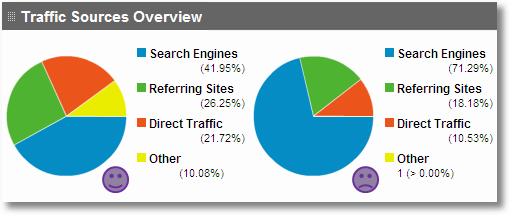
- Organic traffic
Organic traffic is used for referring the visitors that came to the website as an unpaid search. Organic traffic is completely opposed to paid traffic. Organic traffic appeared in a site results in searching that user performs in a search engines, for example Google, Bing etc.
2. Refferal Traffic
Referral traffic is a traffic which reports visits that came to the website from different sources. When someone clicks on a hyperlink to go to a new site. It termed as referral search.
3. Social Traffic
It refers to the traffic coming to a website, Social traffic can be Paid or organic traffic depends on traffic if traffic came from marketing or social medias.
4. Direct Traffic
Direct Traffic refers as Direct Access to a website. It occurs when a user or a visitor lands directly on a website, without clicking links.
5. Paid Traffic
Paid traffic means any visitor visits your website with paid advertising promotions. PPC is the one of the most common paid traffic. Pay per click which utilizes Google ad words.
Basic steps for tracking a website using Google Analytics:
- Create Google Account.
- Sign-up into Google Analytics with your google Account.
- At the Bottom left sidebar of your dashboard,click the admin button.
- Create an account.
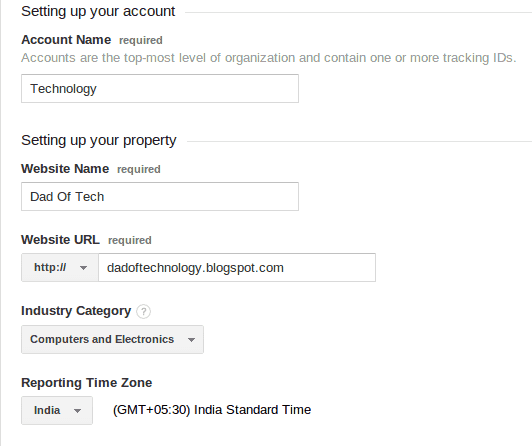
- Click on the website option and add your website name,URL.
- Choose Country,Time zone and industry.
- Click on to Get Tracking ID.
- Install or add tracking id on your website.
- Then Copy and Paste tracking id in the analysis and web property in Blogger.
- Paste the Tracking code in the theme section.
- Saves the theme.
 Sarga SEO Analyst